TUI
The client provides a text-based user interface (TUI) to monitor and manage connected agents.
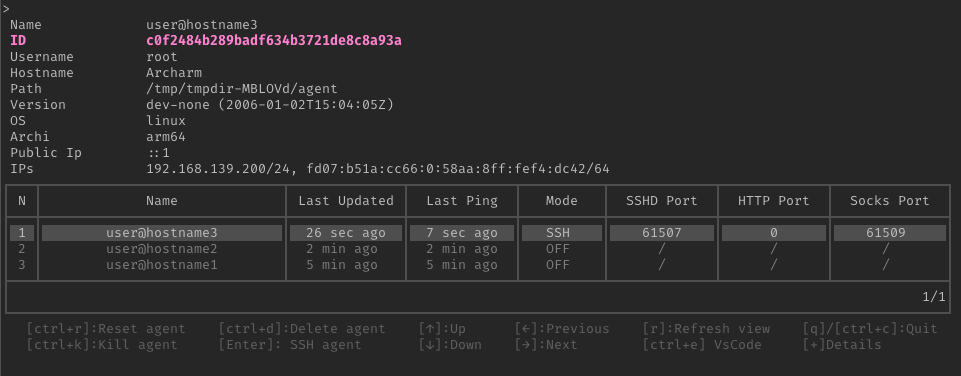
Quick workflow
- Start the TUI with
tealc tui. - Select an agent with the arrow keys.
- Press
+to show additional agent details. - Press Enter to open an SSH session.
- Press
ctrl+fto configure local forwards for that session.
The TUI refreshes the agent list periodically. Use r after changing server or agent state when you need an immediate refresh.
TUI keybinds
| Key | Action |
|---|---|
[ctrl+r] | Reset the agent (press twice to confirm) |
[ctrl+k] | Stop the agent (press twice to confirm) |
[ctrl+d] | Stop the agent and attempt to delete the binary (press twice to confirm) |
[Enter] | Start an SSH session |
[ctrl+e] | Launch VS Code (press twice to confirm) |
[ctrl+f] | Manage port forwards (edit, add, or remove) |
[+] | Toggle agent details |
[r] | Refresh the agent list |
[↑]/[↓]/[←]/[→] | Navigate the agent list |
[q]/[ctrl+c] | Quit the TUI |
ctrl+r, ctrl+k, ctrl+d, and ctrl+e require the same key to be pressed twice in a row to confirm the action. The first press shows a confirmation prompt; any other key in between cancels it.
If the selected agent has a static password configured that isn’t already cached, confirming the action switches the TUI into a password prompt instead of running immediately; the action completes once the password is entered.
Equivalent functionality for the kill, reset and delete actions is also available as standalone commands:
tealc (kill|reset|delete) <AGENT_NAME>
The kill command also accepts a --delete flag to delete the agent’s binary after termination, equivalent to the TUI’s ctrl+d action:
tealc kill <AGENT_NAME> --delete
When SSH ControlMaster is enabled (see ControlMaster), both the TUI actions and the standalone tealc kill/tealc reset commands reuse an existing master connection if available, avoiding the password prompt. If no master connection exists, a new connection is automatically created, which will also establish the ControlMaster socket for future use.
tealc delete is unaffected by ControlMaster since it uses a separate HTTP-based API path instead.
All known agents can be listed with:
tealc list
Extended details
Some information is hidden by default. Press + to toggle the details.
The TUI is an interactive client, not a replacement for the server’s health and metrics endpoints. For connection counters and transport diagnostics, see metrics and Diagnose an agent.
Port forwarding menu
Press [ctrl+f] to open an interactive forward editor for the agent. The menu displays forwards in a table and allows you to:
- Navigate using
[↑]/[↓]to move between rows,[←]/[→]or[Tab]to move between columns - Toggle or cycle with
[Space]: enable/disable a forward in the checkbox column, or cycle-L/-Rdirection on custom forwards - Edit addresses by typing directly in a cell; press
[Backspace]to delete characters - Add a forward by pressing
[+]from anywhere in the table - Delete a forward by pressing
[ctrl+r]or[ctrl+d]when focused on a custom forward row - Launch SSH by pressing
[Enter]to save changes and open an SSH session with the configured forwards - Save without launching by pressing
[ctrl+s] - Cancel by pressing
[Esc]or[ctrl+c]without saving
The forward menu supports the same address types as the tealc forward command: TCP ports (default for numeric addresses), Unix socket paths (starting with / or ~), and (on Windows) named pipes (starting with \\). See Forwarding for details and examples.